Showing posts with label AppServer. Show all posts

Friday, December 27, 2024

Oracle Weblogic 12c Administration - Part 7

December 27, 2024 0


WebLogic Server Security:
    * It will handle a security logic and decisions for a domain.
Authentication Providers : It will check and provide the authentication.
Role mapping providers : It will provide the list of roles and segregation the permission.
Authorization provider : It will match the user with roles and remove the roles if doesnot matches with user. It will permit or deny the access.
Credential map providers : It will provide access to third parity provider.
Password validation providers : It will allow the rows and type or change a password for the users.
Certificate providers : It will validate the path of the domain and SSL certification along with third parity validation.
Auditing Providers : It will provide auditing relate queries.
Available Authentication Providers:
* Default by Internal LDAP
* LDAP (generic and vendor specific)
* Database (multiple DBMS providers)
* SAML (Security Assertion Markup language)
Identity Asserters:
* Default
* LDAP X509
* SAML
* Negotiate (SPNEGO)
LDAP Architecture:

WebLogic Administrative Groups:

LDAP issues:


=========================================================================


Sunday, December 22, 2024

Oracle Weblogic 12c Administration - Part 6

December 22, 2024 0


WebLogic Cluster:
    * It is a logical group of managed servers from the same domain.
    * It provides high availability for the web application, web services, JMS and EJB.
    * We can add a server dynamically.
Advantage of Clustering:

Pros and Cons of Single tier and multi-tier cluster:

WebLogic Proxy Plug-ins:
* Load balancer send a client requests to WebLogic server in a round robin method.
* It will help to send a request to failed or unavailable server in the domain
* It routes the request based on the WebLogic server cookies.
Oracle HTTP Server (OHS)
* It is based on Apache web server
* Installed with the WebLogic Server Plug-in module (mod_wl_ohs) by default
            include "mod_wl_ohs.conf"
* This plugin should be configured by using the mod_wl_ohs.conf file.
* The main configuration file is httpd.conf. It will contain a WebLogic plug-in configuration file as well.
* Configuration file of OHS can found under /Domain_name/config/fmwconfig/components/OHS/instances/OHS_instances_name
Unicast & Multi cast:
Troubleshooting a cluster issue:
* We have to check the WebLogic server Logs
* We have to analsis the OHS Logs
/Domain_name/servers/instance/logs
* Recording the OHS error under this ohs_instance_name.logs
* Recording the access request log under this access_log file.
* It may be due to OHS to WebLogic server connectivity issues
* Multicast connection issues
        * Request session time out issue
Transaction:
* A transaction is a process which handle a group operations as single flow.
It have a four key values as follows:
* Atomic : It will complete with full operation not permit with partial success.
* Consistent : A transaction change a system from one state to other state.
* Isolated : Each transaction will run independently.
* Durable : It will stay in the system if failure of the system.
WebLogic Log location:

Severity Low to High level of log:


Thursday, December 19, 2024

Oracle Weblogic 12c Administration - Part 5

December 19, 2024 0


 Node Manager
Node Manager is a WebLogic Server Utility.
* It will used to start or stop the Administration and managed server by remotely.
* It will monitor the health of an instance of WebLogic Server and automatically restart if it fails.
* Runs a separate process on the same machines as instance of WebLogic Server.
* It can be set as operating system service to start automatically when a system is rebooted.

Traditional model of Node Manager:


New model of Node Manager:


Starting process of Node Manager 


Some of important parameters in the nodemanager.properties file


Some of the import files under Node Manager home directory:
    * nodemanager.properties : Define a configuration setting for a Java based Node Manager processes.
    * nodemanger.domains : Define a domains which node manager needs to control
    * nodemanager.log : It is used by node manager to logging of process.
    * nm_password.properties : Stores the encrypted Node Manager username/password that the Node manager client uses to authenticate itself to Node manager.
    * boot.properties : It is created by Node Manager to hold a server's encrypted credentials
    * startup.properties : It will record the server startup and health monitoring
    * servername.lck, servername.pid, servername.state : These files are used by Node Manager to track the server status.
    * servername.out : It is a log file for a server started by Node Manager that contains stdout and stderr messages generated by that server.

Deploying the Application into WebLogic server


Software life cycle of WebLogic server:


Type of Java EE deployments:


Deployment Descriptors:
    * It is an XML file packaged within deployment that set properties of the application.
    * Each Java EE deployment has a standard and WebLogic specific deployment descriptors.
Application Load and Street testing:
* Load testing measures performance for a system at different level of concurrent request loads.
* Stress testing will be caring a system limit test.
Load testing tools:
* JMeter
* HP LoadRunner
* Oracle Load Testing
* Grinder

The Grinder Architecture Overview:


Major cause of Performance issue:


Wednesday, December 11, 2024

Oracle Weblogic 12c Administration - Part 4

December 11, 2024 0


WebLogic Server Life cycle:

Most import life cycle of WebLogic server status as follows:

  • Running: The server is running with full function. 
  • Shutdown : The server is configured and not running or active state.
  • Failed: The server is in failed or not functional state. We need to take a action on it.
  • Admin: The server is running, but it is able for administrative operation only.
Starting script for the Admin server
    * startWeblogic.sh [no parameter required]
staring script for the Managed server
    * startManagedWebLogic.sh [instance named of the managed server]

We need to provide the user credential while start or stop the WebLogic server. It might be lead to security risk. Hence we can updated  the login credential  into boot.properites file. The server reads the file for credentials and it will bring up the server if the entries are valid.

WebLogic Server Startup issues:
* JVM got crash during start up of WebLogic server
* Missing or invalid server startup parameter 
* Missing or invalid boot credentials or SSL issue
* Invalid or corrupt of domain configuration
* Another process using the IP address and port number

Overview of JDBC:

JDBC means Java Database Connectivity API.
* It is a platform independent for access the database.
* It comes along with WebLogic sever installation or through your database vendors.


* JDBC drivers for Oracle and other database drivers are include while performing the WebLogic Server Installation. 
* Drivers are added into CLASSPATH by default. We need to updated of other drivers into CLASSPATH if you plan to install it.
* The configuration of WebLogic Server data source is stored in xml format and called JDBC module.
* JDBC modules is a either system module or application module.
* System module is used to created by admin console or WLST. It resides in the domain configuration path : domainname/config/jdbc/dsname-jdbc.xml
* Application module can be deployed either in a Java EE application or stand alone.
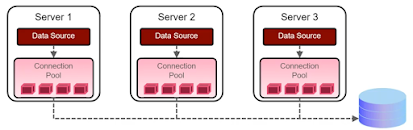
Java Data Source:
* Data Source is a Java object targeted to and managed by one or more instance of WebLogic servers.
* Deployed a Data Source has connections to a particular database in its connection pool ready to go for applications running of those servers.
* The connection pool determine which database is used and how many connections are in the pool.
* Application locate a data source in a server's tree of resources by using the Java Naming and Directory Interface API.
* The application has a reference a data source can be connected into database.


Java Naming and Directory Interface (JNDI)
* It is an API for accessing directory or name services.
* WebLogic Server keeps a tree of its resources in memory that can be accessed by using JNDI.
* Context - A container node in the JNDI tree that can obtain or get other contexts and objects.
* Object - A leaf node in the context.

Data Source types:

* Generic data source
* It is a standard data source with connection pool connect with database.
* Multi data source
* It is collection of generic data source tied with multiple databases.
* It can be access with multiple database engine.
* It can be failover or load balance to other member of generic database
* The application can be access like a single generic data source.
* GridLink data source
* It will exclusive work in Oracle RAC database
* It will provide a high availability
        * Proxy data source
* It is a light weight data source and provide for accessing partition data sources using                                simplified naming.
* Universal Connection Pool data source:
* It provide alternative connection pool technology to traditional connection pooling.
* It is not recommendable.

Connection pool setting:


Tuesday, December 10, 2024

Oracle Weblogic 12c Administration - Part 3

December 10, 2024 0


Creating WebLogic Domain:

Development Domain Mode: 

* It allows applications to be auto deployed.

* The admin console auto-locks the configuration by deafault.

* The admin server can handles administration and run applications.

* We can able to use the test/demonstration digital certificates for SSL.

Production Domain Mode:

* It will not allow the applications to auto deployed and disable mode.

* We should not use the demo digital certifcates for SSL.

* The admin console does not allow auto-locking of the configuration.

Domain creation Tools:

* Configuration Wizard : Graphical user tool for a domain creation

* WebLogic Scripting Tool (WLST) : We can able to create a interactive method of creating a domain  

  through WLST script.

* Pack and Unpack Utilities: We can copy an existing domain and run on other machine.

Workflow of Domain Creation:


Domain File structure:

* Domain-name : The name of this directory is the name of domain.
* bin - Scripting for start and stop the servers in the domain
* config - The saved configuration of the domain is contained in the config.xml file and other domain related configuration files.
* lib - JAR file are placed and created a CLASSPATH of each WebLogic Server started on this machine.
* nodemanager - Default location for the nodemanager
* pending - Domain configuration file is saved but not active from Domain side.
* security - Domain-wide security related files
* servers - One sub directory for each server in the domain
* server1 - The server directory for each server with name
* Data - Data for internal LDAP, node manager and saved diagonstics.
* logs - Server log files
* stage - Default stage location for the deployed applications.

Creating a domain Archive through Pack tool:
% cd /Middleware_path/oracle_common/common/bin
% ./pack.sh -domain=/domain_path/domain_name -template=name.jar  -managed=true

Unpacked the Domain Archive through Unpack tool:
% cd /Middleware_path/oracle_common/common/bin
% ./unpack.sh -domain=/domain_path/domain_name -template=/pathtojarfile/name.jar

Creating the domain with Configuration Wizard tool:

1) run a configuration wizard
    %/Middleware_path/oracle_common/common/bin/config.sh
2) Select the location of domain creation
3) Select the template for the domain
4) Define your username and password for the domain
5) Select the JDK 
6) Define Node manager credentials 
7) Add multiple mange servers
8) Create a cluster
9) Review and finish
We can able to see the Domain from the Admin console.


Sunday, December 8, 2024

Oracle Weblogic 12c Administration - Part 2

December 08, 2024 0


Installation and patching of WebLogic server:

    * Download the system requirement and support documents for the WebLogic installation.

https://docs.oracle.com/en/middleware/standalone/weblogic-server/14.1.1.0/sysrs/system-requirements-and-specifications-oracle-weblogic-server-and-coherence.pdf

Minimum requirements:

        * At least 1GHz CPU
* Sufficient disk space (3.9GB for a complete installation)
* Temp space need for 2.5 X 3.9GB
* 1GB of RAM is minimum

P.S. It will be vary if we use the other components such as SOA suite.

WebLogic Server Installers:

* WebLogic server has 4 different type of installers and details as follows:

Generic Installer : It will be complete installation of both Windows and Linux operating systems. It contains binaries, examples and components. It will consume around 830MB size of folder.

Quick Installer: It will be light weight component which has a necessary artifacts to develop and test the application.

Supplemental Installer: Optional supplemental quick installer. It contains examples and sample components.

Fusion Middleware Infrastructure Installer: It will be adds Fusion Middleware Control and Java Required Files (JRF) for managing multitenant domains with multiple partitions.

WebLogic installation work Flow:

Install JDK -> Install Oracle WebLogic Server -> Install Oracle WebLogic Server Infrastructure -> Create a Database Schemas required by FWM product being installed by using Oracle Repository Creation Utility (RCU)

Install the WebLogic server on Linux Operating system:

Grapical Mode method:

1) Your system should support and meet the requirement for the WLS installation.

2) Login into non-root user who want to access the WLS Domain.

3) Download the appropriate JDK tarball file and WebLogic Server generic installer.

4) Install the JDK and untar the WLS file.

%mkdir /installation_path

%mv name.tar.gz /installation_path

%cd /installation_path

%tar -zxvf name.tar.gz

5) Run the WebLogic server generic installer

%java -jar fmw_12.2.1.4.0_wls.jar

6) Welcome screen of Grapical user 

7) Auto update and click on Next button.

8) Select the installation location and click on Next button.

9) On the installation Type screen, select your installation and click on Next button.

10) ON the pre-request check screen, at 100% of success, click Next.

11) On the installation summary screen, click on Install button.

12) On the installation process screent, at 100% of success, Click on Next button.

13) On the installation complete screen. click Finish button.

If you are having problems while installation, We need to enable the verbose log file during the installation.

> java -jar wls_generic.jar -logfile /path/installation.log

Oracle Coherence:

* It will provide a distributed in-memory cache solution
* It will provide a high performance and scalability
* It will distribute the cached data across the cluster
* It can be installed  and manage independently or joined with WebLogic domain.

We need to following up below process for applying a patches in the WebLogic server:

=> Contact Oracle Support
=> checking for existing patches at present WebLogic server.
=> Obtain a necessary patches from Oracle Support.
=> Read the patch README file.
=> Apply the patch by using OPatch.
=> We will need to perform the post step depends up on the README file instruction.

Saturday, December 7, 2024

Oracle Weblogic 12c Administration - Part 1

December 07, 2024 0


Weblogic Server Overview:

    Weblogic server needs Java Enterprise Edition to computing the codes. The Java Enterprise Edition consist of of:
    * Java virtual Machine [JVM]
    * Java platform Standard Edition 
    * Java EE application server
    * Java EE Application Programming Interfaces [Java APIs]

Workflow of client request:


Advantage of Oracle Weblogic Server 12c (WLS) :
  • Providing clustering for load balancing and high availability
  • Providing extensible security realm for authentication and authorization
  • Excute the of Oracle Fusion Middleware (FMW) with Oracle SOA suite, Oracle Webcenter Suite and Oracle Identity Management.
  • It will manage an Oracle HTTP server (OHS) and Oracle Traffic Director (OTD)
System Architecture:


Web client - It is user request or query from the web browser
Firewall - It will analysis the user request and redirect to Load balancer.
Load balancer - It will provide a Virtual IP address of Weblogic servers and redirect the request to depends upon Load balance algorithm [i.e Round robin, least connecting, IP hash]. 
Weblogic server/Middle tier - It will redirect the user request with their query after backend validation of backend or Database server.
Database/Backend system: It will validate the user request with their input and and response with their query from DB table.

Weblogic Server Domain:
  • A domain is a collection of weblogic resources. It can be spainning with multiple hosts
  • The Domain have a one instance of Weblogic Server acting as administration Server. 
Administration server responsibility as follows:

    * It is a central point through which you configured and managing all the domain resources.
    * It will mange the domain configuration file and distribute the configuration across other servers in         the domain.
    
Manage server:

    * It is managed by admin server.
    * It is fully functional of Java Enterprise Edition application server. It will support the web                        application, EJBs application, Web services and Enterprise applications.
    * It will part of Weblogic cluster and provide a load balancing, sacliablity and high availability of           Domain.

Node Manager:

    * It is a separate process which accept the remote command to start. stop or suspend WebLogic               services on the machine.
    * It will be monitoring the server availability and restart incase of failed servers.
    * It will be used to migrate server from failed machine to other machine.
    * It will be manage the OHS, OTS and OID components as well.

Weblogic Server Application Services:

    * Java Database Connectivity (JDBC)
        => The API for accessing  a relational database
        => Data source objects are configured to provide a database access.

    * Java Message Service (JMS)
        => It will take care of Enterprise message system
        =>  It will be configure in multiple resources in WebLogic.

    * Java Transaction API (JTA)
        => WebLogic server acts as  tranaction manager when transaction needs span resources.