Showing posts with label Terraform. Show all posts

Wednesday, April 23, 2025

Terraform [HCL] Language - Write a terraform code

April 23, 2025 0


Hashi Corp Language:


Expressions:
  * Expression work with values in the configuration
  * They can be simple values as text or number
  * We can be use as complex such as data, loops and conditions
   Example:
 list(tuple) - ["us-east1", "us-east-2"]
 map - { name = "user1", department = "devops"}
 bool - true or false
 
versoin = "-> 4.16"
-> will consider minior. It will allow a minor version upto .99 but it will not change a major number in our case is "4".

"*" operation:
It will allow the number in the loop and avoid overloading a variable into memory.
Example:
output "ebs_block_device" {
  description = "block device volume IDs"
  value = aws_instance.splat_lab_labs.ebs_block_device[*}.volume_id
}
Functions:
  * Function is one or more insructions that perfrom a specific task.
  * Terraform functions are used to add functionality or transform and combine values.
  Example:
 resource "aws_iam_user" "web_user" {
   name ="user-${count.index}"
   count = 5
   tags = {
     time_created = timestamp()
department = "OPS"
   }
}
Example2:
resource "aws_iam_user" "functional_user" {
  name = "functional-user"
  tags = {
    department = "OPS"
time_created = timestamp()
time2= formatdate("MM DD YYYY hh:mm ZZZ", timestamp()}
  }
}

Meta Arguments:
count - It allow to set multiple resources within a block.
Example:
resource "aws_instance" "count_test" {
  count = 2
  ami = "ami-0c7c4e3c6b4941f0f"
  instance_type = "t2.micro"
  tags = {
    Name ="Count-Test-${count.index}"
  }
}
for-each meta arugment:
A for loop is using for iterating/executing over the sequence within the block.
Example:
Creating four users while creating an AWS instance.

resource "aws_iam_user" "Accounts" {
  for_each =toset{("Shiva", "Dev", "John", "Abdul")}
  name = each.key
  }
}
Local Values:
  * Local value assigns a name to an expression that can be reused easily.
  * Use case such as various list [ports, username] & reference to other values.
Example:
resource "aws_iam_user" "accounts" {
  for_each=local.accounts
  name = each.key
}
we will define a local function within the block.
locals {
  accounts = toset {("James", "Don")}
}

Dynamic block:
The codes will be reusable within resource block. It will speed up the code execution time.

Version Constraints:
  * Version constraints are configurable strings that manage the version of software to be used with Terraform includes providers and TF version as well.
  * TF version is followed by semantic versioning (Major:Minor:Patch)

= constraint - It will allow the exact version only
!= constraint - Excludes exact version number
< > - Grater than, less than a version number
>= <= - Grater than or equal to or less than or equal to that version
~> - ONlythe rightmost number increments [minor or patch number]

Stored the state file in the remote object through TF code.
terraform {
  required_providers {
    aws = {
  source = "hasicorp/aws"
  version = "5.01"
}
  }
  required_version = " <= 1.4.6"
}

module "s3_bucket" {
  source= "terraform-aws-modules/s3-bucket/aws"
  version "3.14.0"
  bucket =""
  acl = "private"
  force_destroy = true
  
  control_object_ownership = true
  object_ownership = "ObjectWriter"
  
  versioning = {
    enabled =true
  }
|

TF state file saves in bucket and set as provide inside of backet. 

Life cycle management:
create_before_destroy : It will create instead of destroying at first
prevent_destroy : It will prevent from destroying of instance
ignore_changes : It will implement of any changes.
replace_triggered_by : It will overwrite the changes

Saturday, April 12, 2025

Terraform - Part 2

April 12, 2025 0


Terraform Workflow:
Terraform workflows consist of five fundamental steps:


Write - Create  a module of your code
Init - Initialize your code with download of required plugins of provider.
Plan - Review and predict the changes and determine whether to accept this changes.
Apply - Implement the changes in the real environment.
Destroy - Destroying the infra structure which we created.


We can validated the file format through terraform fmt command.

[root@thiru project]# terraform fmt main.tf
╷
│ Error: Invalid multi-line string
│
│   on main.tf line 15:
│   15: resource "aws_instance" "Web_server {
│   16:   ami =
│
│ Quoted strings may not be split over multiple lines. To produce a multi-line string, either use the \n escape to represent a newline character or use the
│ "heredoc" multi-line template syntax.
╵

╷[root@thiru project]# terraform fmt main.tf
[root@thiru project]#


Sunday, March 9, 2025

Terraform - Part 1

March 09, 2025 0

Terraform Installation

• yum install -y yum-utils shadow-utils
• yum-config-manager --add-repo https://rpm.releases.hashicorp.com/AmazonLinux/hashicorp.repo
• yum -y install terraform
• terraform version
• terram -help
• terraform -help plan

Create AWS user for the terraform setup

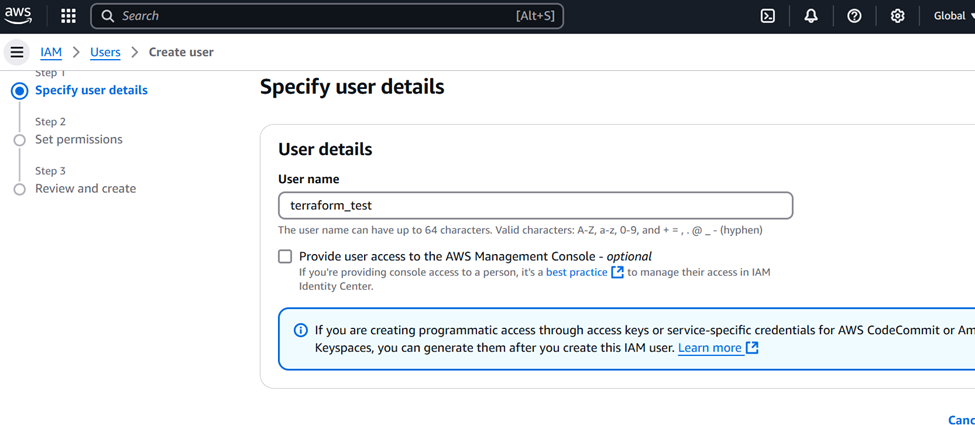
Create a user in AWS:

1) Login into Aws console

2) Navigate into IAM


3) Click on create user button


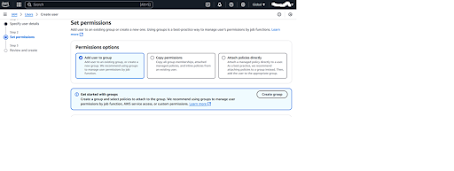
4) Set a permission of new user


5) Click on created user and we can able to see the option for create a key for that specific user.


6) It will prompt the use case of your requirement.


7) Choose the Command Line Interface option 

8) Take a note of Access Key and secret access key. We need to define these parameter inside of Terraform while automate the infrastructure.

Terraform Architecture:

* Terraform follows a declarative approach to infrastructure management which mention a desire state of your infrastructure through configuration files. It takes care of provisioning and configuration of resources to achieve that state.


Terraform has consist of four components.
* Providers
* Modules
* Resources
* Templates
Providers:
It is an essential plugins that provide a interaction between Terraform and remote machines such as Azure, AWS, GCP, VMware and local environments. Terraform uses to providers to provision of resources such as virtual networks and compute instances. We cannot able to create or manage a resources if we are not include the providers in our script.
We need to declare a provider as your root module so that it will inherit with child modules where we can define our desire state of our infrastructure.
Modules:
Module is a collection of template files that resides on a single directory. Module is considered a child module of the template. Modules can be present in local or remote location. Terraform is supporting multiple resources such as Terraform Registry, version control systems, HTTP URLs and private module registries in Terraform.
Resources:
Terraform uses resources blocks to manage various kinds of infrastructure such as virtual networks, compute instances and DNS records. The resource blocks map to one or more infrastructure objects within your Terraform configuration.
Templates:
Terraform template is a collection of files that define the desired state of your infrastructure to be maintained. 


Friday, March 7, 2025

Terraform Introduction

March 07, 2025 0


Terraform Introduction:
Terraform helps user to build, manage or change infrastructure through code. 

Terraform Vs Ansible

IAC [Infrastructure as code]


  • Manage infrastructure with the help of code
  • It's the code used to provision resources including virtual machines such as instances on AWS , Network infrastructure including gateways etc
  • You write and execute the code to define, deploy, update and destroy your infrastructure
  • Code is tracked in a SCM repository
  • Automation makes the provisioning process consistent, repeatable and updates fast and reliable.
  • Ability to programmatically deploy and configure resources
  • IAC standardize your deployment workflow
  • IAC can be shared, reused and versioned.
• IAC Tools:
    1.Terraform
    2.CloudFormation
    3.Azure Resource Manager
    4.Google Cloud Deployment Manager  
Terraform Overview:
• Terraform is an Infrastructure Building Tool (Provisioning Infrastructure)
• Written in Go Language
• Integrates with configuration management and provisioning tools like Chef, Puppet and Ansible.
• Extension of the file is .tf or .tf.json (Json Based)
• Terraform maintain a state with the .tfstate extension
• Deployment of infrastructure happens with a push-based approach (no agent to be installed on remote machines)
• Terraform is Immutable. It can’t be changed after it’s created and destroy is the only option.
• Terraform is using a Declarative method, Declarative Language is Describing what you're trying to achieve without instructing how to do it.
• Terraform is Idempotent ,what ever looking for you which already is present means don't apply and exit without any changes.
• Providers are services or systems that Terraform interacts with to build infrastructure on.
• Current Terraform Version is 1.11
• Terraform is cloud-agnostic but requires a specific provider for the cloud platform
• Single Terraform configuration file can be used to manage multiple providers
• Terraform can simplify both management and orchestration of deploying large-scale, multi-cloud infrastructure
• Terraform is designed to work with both public cloud platforms and on-premises infrastructure (private cloud)
• Terraform Workflow
        1.Scope 2.Author 3.Intilaize 4.Plan 5.Apply
 
Configuration file of Terraform:


Terraform is consist of 3 blocks such as terraform block, provider block and resources block.
Terraform Block:
It defined a terraform required version and required provider of terraform.
Provider Block:
It define the cloud provider plugin along with region where need to provision the infra structure.
Resource Block:
It provide the resource allocation or built a infra structure of your requirement. For example
"aws instance" is an AWS API  and Web server is a Terraform name of the block.

resource "aws instance" "Web server" {
ami ="image name"
instance type = "t2.micro"
tag = {
    Name = "Web Instance"
}