Showing posts with label Cloud. Show all posts

Wednesday, April 2, 2025

GCP - VPC - part 2

April 02, 2025 0


VPC - Virtual Private Cloud

VPC has classified two types in the GCP.

Auto Mode : It is a default VPC in the GCP. The network has configured by automatically and firewall has been pre-configured as well. We should not use this Mode into Production environment.

Custom Mode : The IP allocation and firewall setup needs to take care by us. It is safe and secure setup for the production environment.

Subnet is playing a vital role in the VPC network.


The project can communicate from Subnet A & B  across the Regions through internal networks. C & D needs to communicate through external network even though both are belongs into same region.


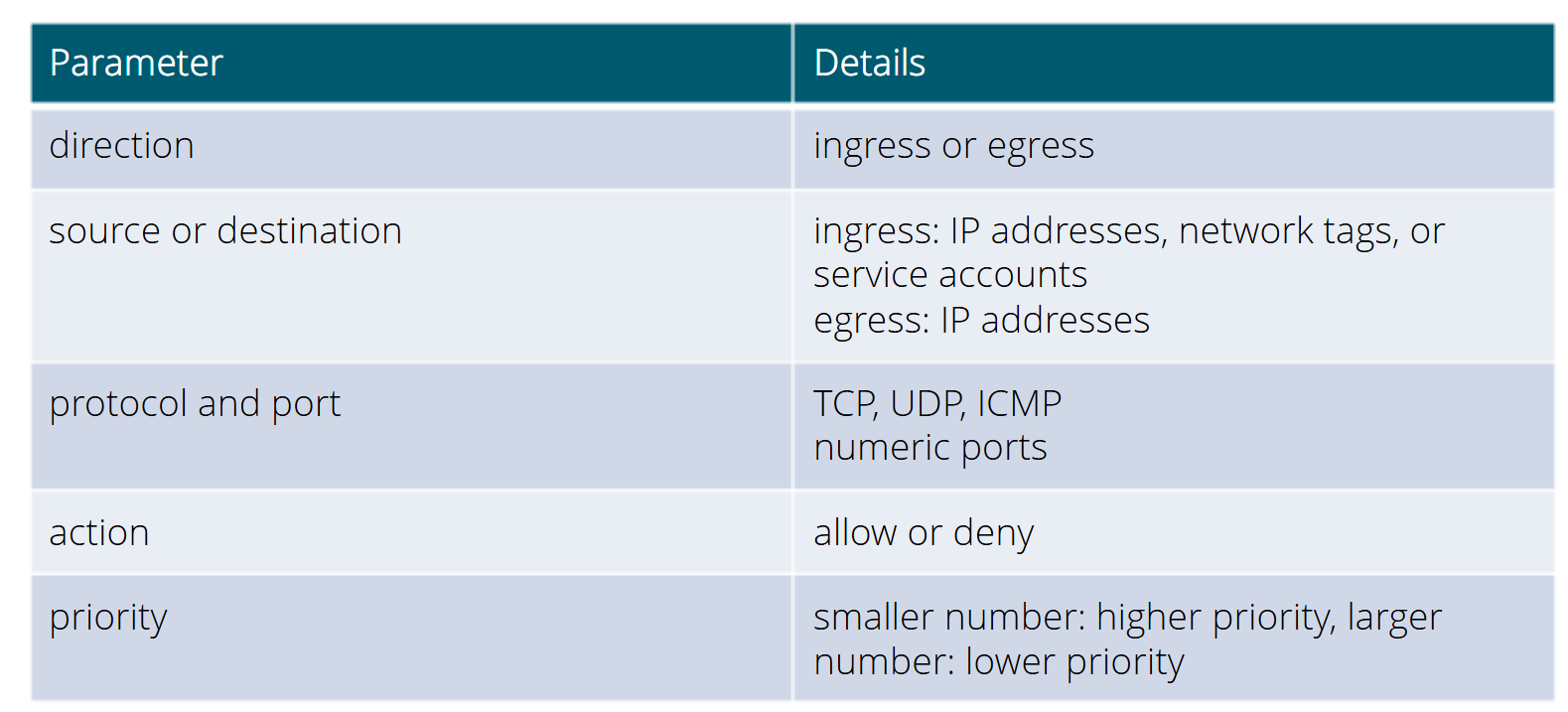
Firewall Rule Configuration:

Load Balancing:


Application Load Balancer:

Proxy Load Balancer:


Tuesday, April 1, 2025

GCP - Compute Engine - part 1

April 01, 2025 0


Compute Engine:
Compute engine is a computing and hosting services that let you create and manage a infra structure. Google compute engine is the Infra structure as a Service [IaaS] components of Google cloud.
General purpose of Compute Engine:


E series is used for Dev and test environments. It is very efficient for lowest cost per core.
* Virtual Desktops
* Web and apps server with low latency
N series is a balanced and performance workloads. 
* CRM, BI or back office
* Data pipelines
* Databases
C series is used for high performance application.
* Game servers
* Ad servers
* Data analytics
* Media streaming and transcoding
* CPU based AI/ML
H series is a highest compute per cores.
* Game servers
* Media streaming and transcoding
* High performance computing (HPC)
* CPU based AI/ML
M series is highest memory per cores.
* Large database
* Modeling and simulation
Z series is a highest storage per cores.
* Data analytics
* Large horizontal database scale out
G series is an inference and visualization with GPUs
* Video transcoding
A series is a highest performance of GPUs
* Deep learning
* Recommendation Models
Preemptible Instances
  * Instances offered at a discount (60 to 91%) in periods of excess Compute Engine capacity
  * Compute Engine might stop these instance in case of need a more computes.
  * Run for a maximum of 24 hours
  * No SLA
Spot instances are similar like preemptible instances but it will extent after 24 hours.
Cloud Function [Platform as service]
  * Serverless light weight compute service
  * It will support the standalone function that respond to the events
  * It can be written using Java script, Python 3 or Java runtimes
Cloud Run: [Platform as Service]
  *  Container based  serverless platform
  * Request based auto scaling and scale to Zero
  * Built in traffic management
Cloud Storage:
Classified the cloud storage in GCP as follows:

Persistent Disks * Durable, high performance block storage for virtual machines * Performance scales with size of the disk and with number of vCPUs on the VM * Data stored redundantly Local SSD * High performance block storage for virtual machines. * Physically attached to the server * Higher throughput and low latency than persistent disks * Each local SSD is 375GB.

Choose the storage depends upon Database:


User case study of storage:
Cloud Storage - Un structure data [Videos, images, backups and achieve]
Persistent Disk - Disk for Virtual machines
Local SSD - Flash optimized databases, Hot caching layer for analytics
File store - Web content management, Rendering and media processing
Bigtable - High through put application such as Big data, IoT
BigQuery - Big data analytics, Business intelligent
Cloud Fire store - User profiles, cross device data synchronization


Sunday, March 30, 2025

GCP - Introduction

March 30, 2025 0


GCP is a public cloud vendor like competitors of Azure and AWS.  Customers are able to access server resources housed in Google's data centers around the world on a pay-per-user basis.

GCP offers a suite of computing services to do everything from Cost management to data management to delivering web and video over the web to AI and machine learning tools.

Google's global infrastructure has given 24X7 services around the world with highest speed and reliability. GCP starts with a region and within a region are availability zones. These availability zones are isolated from a single point of failure. Some resources such as HTTP global load balancer are global and can receive requests from any of the Google cloud Edge locations and regions. Others resources like storage can be regional.  The storage is distributed across multiple zones within a region for redundancy.
We need to select the locations depending on the performance, reliability and scalability and security needs of your organization. 

Plan to create a GCP setup:


Policies are inherited from the Organization root folder. It will act as parent of the policies within organization.


Setting the bill account is very important before start the project. We need a billing administrator role to perform this task. we can able to set a budget from project level or billing account level.

Cloud Shell:
    GCP includes command line tools for Google cloud product and services:
        gcloud - Main CLI for GCP cloud
        gsutil   - Cloud storage
        bq - biq query

Sytex of gcloud:
gcloud + component + entity + operation + positional args + flags


Cloud Identify:
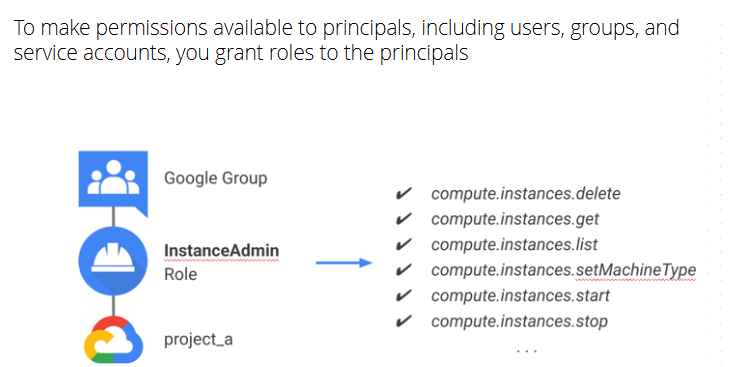
Role - Define a permission of each entity within the group/principal. To make a permission is available into principals including user, group and service accounts, we need to give a proper roles assign into principals.

  • Policies are inherit from top to bottom approach,  There is a no ways to remove the permission that was grant at the top level into resource level.
Different types of Roles in GCP:
  • Basic Role - Owner, Editor and view
  • Predefined Role - Service specific role [pub/sub subscriber]
  • Custom Role - Based on user specified list of permission

Service account:

We can create a service account for automation of manual task. We can able to create a service account through GUI or glcoud CLI.
#gcloud compute instances create myinstance --service-account servicename

Create a service account for PubSub subscription
#gcloud pubsub subscriptions create [subscription_name] --topic [Topic_name] --push-endpoint=[Cloud_Run_Service_URL] --push-auth-service-account=[serviceacountname]@prjectid.iam.gserviceaccount.com

Best practice of Access Management:
  •    Donot grant a basic roles [Owner, Editor, viewer]
  •    Have more than one organization admin
  •    Grant roles to Google groups instead of individuals
  •    Be cautious when granting the Service Account user role
  •    Regularly check Cloud Audit logs and audit IAM policy changes.


Saturday, March 1, 2025

Creating AWS Load Balancer Controller under EKS in the AWS environment

March 01, 2025 0


 AWS Load Balancer Controller:

Architecture diagram


Associates an OIDC provider with your EKS cluster:

eksctl is a CLI tool for EKS cluster in AWS. We can able to map the existing OIDC provider into EKS cluster through below CLI command.

#eksctl utils associate-iam-oidc-provider --cluster test-demo-cluster  --approve --region us-east-2

Created an IAM role for the EKS cluster:

An Amazon EKS cluster IAM role is required for each cluster. Kubernetes clusters managed by Amazon EKS use this role to manage nodes and the legacy Cloud Provider uses this role to create load balancers with Elastic Load Balancing for services.

Creating the Amazon EKS cluster role:

You can use the AWS Management Console or the AWS CLI to create the cluster role.
AWS Management Console
Open the IAM console at https://console.aws.amazon.com/iam/.
Choose Roles, then Create role.
Under Trusted entity type, select AWS service.
From the Use cases for other AWS services dropdown list, choose EKS.
Choose EKS - Cluster for your use case, and then choose Next.
On the Add permissions tab, choose Next.
For Role name, enter a unique name for your role, such as eksClusterRole.
For Description, enter descriptive text such as Amazon EKS - Cluster role.
Choose Create role.

AWS CLI
a) Copy the following contents to a file named EKS-loadbalancer-policy.json.
{ "Version": "2012-10-17", "Statement": [ { "Effect": "Allow", "Principal": { "Service": "eks.amazonaws.com" }, "Action": "sts:AssumeRole" } ] }

b) Create an IAM policy:

#aws iam create-role \
  --role-name AWSLoadBalancerControllerIAMPolicy  \
  --assume-role-policy-document file://"EKS-loadbalancer-policy.json"

Set up an IAM service account in an EKS cluster, allowing the AWS Load Balancer Controller to manage AWS Load Balancers on behalf of the Kubernetes cluster.

  • Creates a Kubernetes ServiceAccount named aws-load-balancer-controller.
  • Associates it with an IAM Role (AmazonEKSLoadBalancerControllerRole).
  • Attaches the AWSLoadBalancerControllerIAMPolicy.
  • Allows Kubernetes to use AWS IAM for authentication.

eksctl create iamserviceaccount \
  --cluster=alb-demo-cluster \
  --namespace=kube-system \
  --name=aws-load-balancer-controller \
  --role-name AmazonEKSLoadBalancerControllerRole \
  --attach-policy-arn=arn:aws:iam::<aws-account-id>:policy/AWSLoadBalancerControllerIAMPolicy \
  --region us-east-2 \
  --approve

Validated the controller:
#kubectl get deployment -n kube-system aws-load-balancer-controller

Step 2: Install AWS Load Balancer Controller:

Install the AWS Load Balancer Controller.
Installs the AWS Load Balancer Controller in the kube-system namespace.
Links it to the existing aws-load-balancer-controller service account.
#helm install aws-load-balancer-controller eks/aws-load-balancer-controller \
  -n kube-system \
  --set clusterName=alb-demo-cluster \
  --set serviceAccount.create=false \
  --set serviceAccount.name=aws-load-balancer-controller

Step 3: Validated the load balancer:

#kubectl get deployment -n kube-system aws-load-balancer-controller

Thursday, September 26, 2024

AWS - Auto Scaling

September 26, 2024 0


We can scale up or scale down the resources through Auto scaling in AWS.

Auto scaling is classified as 3 parts:

* Auto Scaling group
* Launch Configuration/Template
* Scaling Policies 

Auto Scaling group : We can define a minimum and maximum require resources through Auto scaling group.

Launch Configuration/Template - Defined a AMI and other require resource parameter for the EC2 instance.

Scaling Polices: It is classified as 3 types:

* Manual - We can update the minimum and maximum resource requirement by manually or through CLI,
* Scheduling : We an schedule the desire resource requirement through crontab.
* Dynamic - It will increase the resource based on metrics.


Wednesday, September 25, 2024

AWS - Load Balancer

September 25, 2024 0


Load balance is a method of distributing the network traffic equally across the connection/network pool that support an application.

AWS is provided a load balancing called ELB [Elastic Load balancer]

ELB is classified as below:

* Network Load balancer
* Application Load balancer
* Classic Load balancer 
* Gateway Load balancer

Network Load balancer is routing the traffic through TCP/IP [Layer 4] & Application Load balancer is routing the traffic through https/http [Layer 7]

* ELB should have a minimum 1 listener is in active state, so that it will listen the traffic and routing into target group.


Tuesday, September 24, 2024

AWS - VPC

September 24, 2024 0


Basic Networks:

IPv4 is connectless protocol that use multi packet routing to break data into smaller blocks to send across the internet.  IPv4 is a series of of four eight-bit-binary numbers separated by a decimal point. 

IPv4 has a different type of classes:

Class A - Address range [1 to 126] - Subnetmasking [255.0.0.0] - Used for large number of hosts
Class B - Address range [128 to 191] - Subnetmasking [255.255.0.0] - Used for medium size network
Class C - Address range [192 to 223] - Subnetmasking [255.255.255.0] - Used for local area network
Class D - Address range [224 to 239] - NA - Reserve for multi tasking
Class E - Address range [240 to 254] - NA - This is class is reserved for research and development purpose. 

The RFC1918 address is an IP address that is assigned by an enterprise organization to an Internal host, these IP address are used in private networks which is not available or reachable from internet.

10.0.0.0 - 10.255.255.255 [10/8 prefix]
172.16.0.0 - 172.31.255.255 [172.16/12 prefix]
192.168.0.0 - 192.168.255.255 [192.168/16 prefix]

We cannot use of first four ip address and last IP address in the network segments. It will be reserve to use for it.

Example:

Network segment of 172.31.0.0

172.31.0.1 - Reserved by AWS for the VPC router.
172.31.0.2 - Reserved by AWS for DNS server
172.31.0.3 - Reserved for the future use.
172.31.0.255 - Network broadcast address. We don't support the broadcast in a VPC, therefore we reserve this address.

Creating the VPC network:

Login into AWS console and navigate into VPC.

1)      Select the VPC only option.


We will get a more network option while selecting the VPC and more option. It will display the availability zone along with network CIDR.

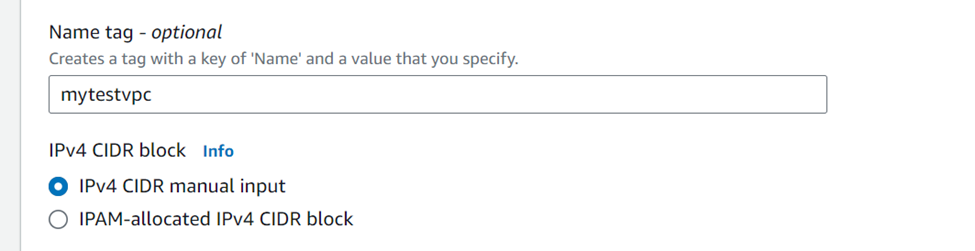
2)      Select the IPv4 CIDR manual input in the IPv4 CIDR block section.


If there is an Amazon VPC IP address Manager (IPAM) address pool available in this region, you can get a CIDR from an IPAM pool. If you select an IPAM pool, the size of CIDR is limited by the allocation rules on the IPAM pool. The same will be applicable for IPv6 as well.

3)      Select a default zone, we can specific a different Tenant as well.


4)      Create a tag for grouping purpose and click on create VPC button.


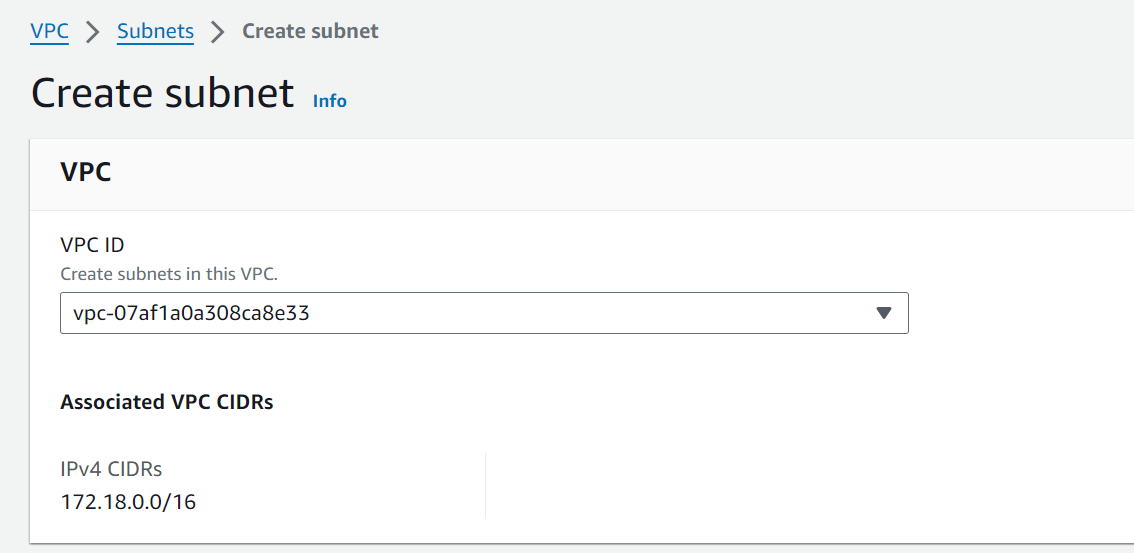
We need to create a sub netmask according your requirement and mapped into VPC.

Click on subnet from the VPC dashboard.


Click on create subnet button and select the VPC which you want to create a sub netmask.


Define a subnet name and availability zone as per your requirement.


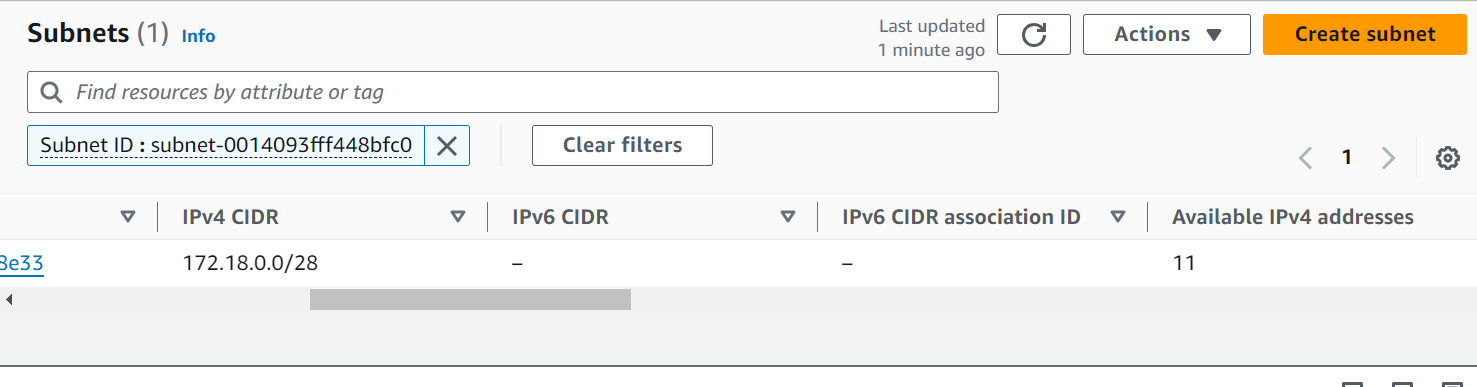
I can able to get 11 number of IP address as per my sub netmask and 5 IP address goes for reservation.


We need to create a internet gateway incase of access this machine from your system or outside world.

Creating an Internet Gateway:

Navigate into Internet gateway from left hand side of the VPC dashboard and clicked create Internet gateway button.


Sunday, September 8, 2024

AWS - Introduction

September 08, 2024 0


Amazon Web Services is a subsidiary of Amazon that provides on-demand cloud computing platform and API's to Individuals, Companies and Governments on a metered Pay-as-You-go basis.

AWS Global Infrastructure as of 2024:

The AWS Cloud has 108 Availability Zones and 34 launched Regions across the world.  They will plan to extend another 18 more Availability Zones and Six more Regions in Mexico, New Zealand,  the kingdom of Saudi Arabia, Thailand, Taiwan and the AWS European Sovereign Cloud.


Amazon cloud computing resources are hosted in multiple location across world wide.  These location are composed of AWS Regions, Availability Zones and local Zones.  

AWS Regions: Region is a logical name which represent some of the Geographic location.  Each AWS Region has multiple, isolated location knows as Availability Zones.

Local Zones: We can place resources such as compute & storage in multiple locations closer to end user. Local zones are designed to bring core services closer  to end users.

AWS has a multiple resource components for various purpose, we will walk through one by one now.

EC2 - Elastic compute cloud

EC2 provides scalable compute capacity in the AWS cloud. We can create a multiple virtual machines through EC2.  We can scale up or down the resources easily through EC2.

EC2 Instance Purchasing Options:

On-Demand:

* It is very expensive and very flexible purchase options

* We are charged only when instance is running (billed by hour)

* We can terminate or provision at any time.

Reserved:

* Allows us to purchase an instance for a specific time period.

* We can get a special discounts while purchasing it.

Spot:

* Amazon will sell the unused resources with lower price.  

* We can bid on an instances type and get those instance if bid match with our price or go below to our bid price.

* Spot price will be fluctuate based on supply and demand in the market.

The price of EC2 instance will vary based on Instance type, Region, EBS and storage resources.

Amazon Machine Image:

* A preconfigured a package image (ex. ISO) along with necessary software's which require to launch an EC2 instance.

AMI comes with 3 categories as below:

1) Community AMI
2) AWS Market place AMI
3) My AMI [User created image]

EC2 instance Family:

General purpose: It is combination of CPU and memory with common purpose depends upon the request[family type is t2, m4, m3]. Example of common websites, web application, micro service and code repos.

Compute Optimized: It will provide more compute power to host. It will require for high end customers [family type is c3, c4, cc2]. For example of web servers, batch processing and analytics.

Storage Optimized: It will provide a more IOPS while access the data from the storage[family type is d2, i2 and i3]. For example data warehousing and NoSQL

Memory Optimized: It will give a more random memory while access the application [family type is r3 and r4]. It is mainly used for Hadoop and SAP Hanna application.

Allocation the IP address to EC2 Instance:

Private IP : By default every EC2 instance will be provided with a private IP address.
Public IP: EC2 instance can be launched with or without public IP address.  It will allow the instance to communicate from Network.
Elastic IP: Static public IP address for the instance. It is chargeable.

Storage service:

EBS - Elastic block store - The data will access in block level. we can able to read or write concurrently.
EFS - Elastic File store - The data will access a serial level.
S3  - Simple storage service - The data will save as object. We can get a unique ID and endpoint after uploaded the data.

EC2 and EBS should be in same availability zone.


Saturday, September 7, 2024

Cloud - Introduction

September 07, 2024 0


Cloud Service : Any infrastructure service which is make available for user based request via internet.

Cloud Computing: Cloud computing is the delivery of computing services such Server, Storage, Databases, Networking and Software/Analytics over the internet hosted at a remote data center managed by a cloud service provider. 
Instead of buying, owning and maintaining physical data centers and servers, you can access technology services such as computing power, storage and database on an as-need basis from a cloud provider with pay-as-you-go model.

Cloud Service Provider: The company who is providing the cloud computing services to the end  users such as AWS, Azure, GCP, Oracle cloud, Rackspace, DigitalOcean, Saleforce cloud and Alibaba cloud.

Benefits of Cloud:

  • Cost
  • scalability & Elasticity - We can provision a require amount resources through cloud. We can increase the resources depends requirement basis without downtime via scale out and scale in.
  • High Availability & Reliability
  • Speed
  • Deploy across the global
Type of cloud Computing:
  • Public cloud, Private cloud, Hybrid cloud and Multicloud


Monday, September 2, 2024

Cloud Migration

September 02, 2024 0


Cloud Migration describes the process of moving some or all the organization's business applications from on-promise into cloud infra structure. The cloud infrastructure that is accessible via internet and which usually own by the hyperscale cloud provider such as AWS, CGP and Azure.

General Business Application:

The organizations to consolidate most of their on-promise business software onto single Vendor's ERP stack  or suite. On-promise business applications live in a single ERP suite and are licensed as modules. An Organization might license module for finance, HR, Inventory, sales, CRM and other functions.

Migration usually does not moving all on-premises software and services to the Public cloud, most of the organizations would prefer to go with hybrid cloud rather than public cloud due to their SOX compliance.
 
The most common hybrid scenario distributes business applications, middleware and services between conventional resources that live in the on-premises data center and virtual resources that live in the public cloud.

The typical on-premises packaged enterprise applications system consists of modules for ERP, finance, human resources (HR), supply chain management (SCM), sales and marketing, and other function areas. These packaged applications are textbook exemplars of the familiar 80/20 rule: out of the box, they aim to deliver at least 80% of what the average customer requires; the rub, however, is that it is the customer’s responsibility to supply the missing 20%.

To help with this, software vendors offer application frameworks, SDKs, and an assortment of middleware services (e.g., application servers, application-specific database services, etc.) that customers use to build their own business applications. Traditionally, these apps ran in the context of an application server and exploited vendor-specified APIs to exchange data with the core modules of (for example) an ERP suite.

Advantage of cloud migration:

Cloud migration is not a zero sum game, an either or choice between on-premises infrastructure, converged or otherwise and public cloud infrastructure.  It has a pragmatic dimension of the infrastructure. Migration gives an organization an opportunity to use public cloud infrastructure as a means to complement or extend on-promises resources and to offset extreme spikes in demand.
  • Cloud provider has deliver a new features and new capabilities at very fast.
  • Cloud provider updated their environment and  software's up to date, so probability of  bug/vulnerability will be very minimum/or nil.
High utilization of resource:

The on-promise environment is tightly coupled with memory, CPU and storage, We need to add a new server to increase resource if any demand of memory, but it will be time consuming and high cost, some of other resource like CPU and storage will be ideal from the new server. 

Cloud decouples compute, storage and other resources from one another.  So subscribers can scale out their compute capacity independent of storage capacity.

Security Responsibilities:

The on-premise environment will not save a data as encrypted format by default. The internal systems are not always sufficiently hardened, security patches and firmware update are not always applied in a timely manner, and password requirements are not always enforced.  User accounts are not always updated or deleted.

Cloud providers are conducting vulnerability scanning, audits, penetration testing and other kind of security testing at regular basis.  Providers typically encrypt all of the data that is stored in the cloud.   

Business Continuity & Disaster Recovery: