Showing posts with label GCP. Show all posts

Wednesday, April 2, 2025

GCP - VPC - part 2

April 02, 2025 0


VPC - Virtual Private Cloud

VPC has classified two types in the GCP.

Auto Mode : It is a default VPC in the GCP. The network has configured by automatically and firewall has been pre-configured as well. We should not use this Mode into Production environment.

Custom Mode : The IP allocation and firewall setup needs to take care by us. It is safe and secure setup for the production environment.

Subnet is playing a vital role in the VPC network.


The project can communicate from Subnet A & B  across the Regions through internal networks. C & D needs to communicate through external network even though both are belongs into same region.


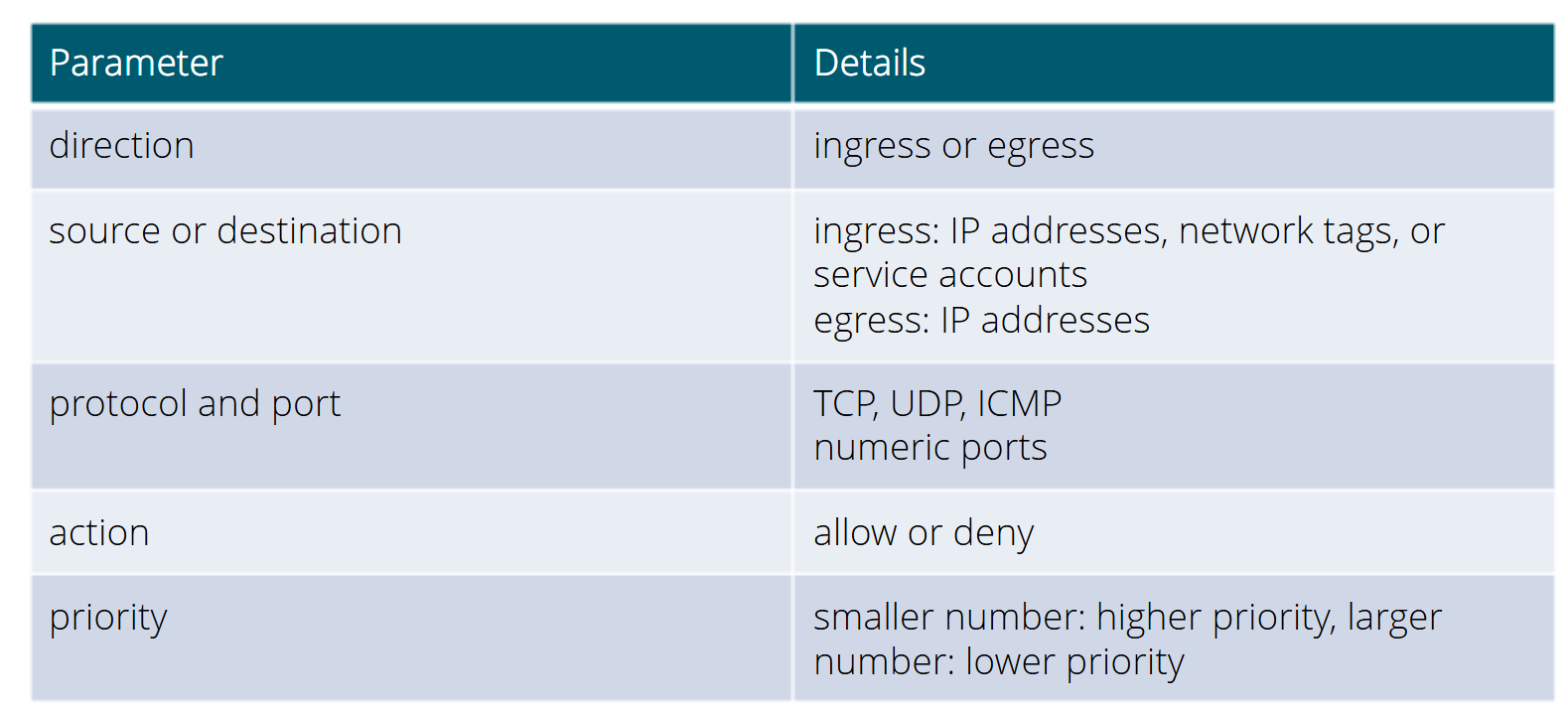
Firewall Rule Configuration:

Load Balancing:


Application Load Balancer:

Proxy Load Balancer:


Tuesday, April 1, 2025

GCP - Compute Engine - part 1

April 01, 2025 0


Compute Engine:
Compute engine is a computing and hosting services that let you create and manage a infra structure. Google compute engine is the Infra structure as a Service [IaaS] components of Google cloud.
General purpose of Compute Engine:


E series is used for Dev and test environments. It is very efficient for lowest cost per core.
* Virtual Desktops
* Web and apps server with low latency
N series is a balanced and performance workloads. 
* CRM, BI or back office
* Data pipelines
* Databases
C series is used for high performance application.
* Game servers
* Ad servers
* Data analytics
* Media streaming and transcoding
* CPU based AI/ML
H series is a highest compute per cores.
* Game servers
* Media streaming and transcoding
* High performance computing (HPC)
* CPU based AI/ML
M series is highest memory per cores.
* Large database
* Modeling and simulation
Z series is a highest storage per cores.
* Data analytics
* Large horizontal database scale out
G series is an inference and visualization with GPUs
* Video transcoding
A series is a highest performance of GPUs
* Deep learning
* Recommendation Models
Preemptible Instances
  * Instances offered at a discount (60 to 91%) in periods of excess Compute Engine capacity
  * Compute Engine might stop these instance in case of need a more computes.
  * Run for a maximum of 24 hours
  * No SLA
Spot instances are similar like preemptible instances but it will extent after 24 hours.
Cloud Function [Platform as service]
  * Serverless light weight compute service
  * It will support the standalone function that respond to the events
  * It can be written using Java script, Python 3 or Java runtimes
Cloud Run: [Platform as Service]
  *  Container based  serverless platform
  * Request based auto scaling and scale to Zero
  * Built in traffic management
Cloud Storage:
Classified the cloud storage in GCP as follows:

Persistent Disks * Durable, high performance block storage for virtual machines * Performance scales with size of the disk and with number of vCPUs on the VM * Data stored redundantly Local SSD * High performance block storage for virtual machines. * Physically attached to the server * Higher throughput and low latency than persistent disks * Each local SSD is 375GB.

Choose the storage depends upon Database:


User case study of storage:
Cloud Storage - Un structure data [Videos, images, backups and achieve]
Persistent Disk - Disk for Virtual machines
Local SSD - Flash optimized databases, Hot caching layer for analytics
File store - Web content management, Rendering and media processing
Bigtable - High through put application such as Big data, IoT
BigQuery - Big data analytics, Business intelligent
Cloud Fire store - User profiles, cross device data synchronization


Sunday, March 30, 2025

GCP - Introduction

March 30, 2025 0


GCP is a public cloud vendor like competitors of Azure and AWS.  Customers are able to access server resources housed in Google's data centers around the world on a pay-per-user basis.

GCP offers a suite of computing services to do everything from Cost management to data management to delivering web and video over the web to AI and machine learning tools.

Google's global infrastructure has given 24X7 services around the world with highest speed and reliability. GCP starts with a region and within a region are availability zones. These availability zones are isolated from a single point of failure. Some resources such as HTTP global load balancer are global and can receive requests from any of the Google cloud Edge locations and regions. Others resources like storage can be regional.  The storage is distributed across multiple zones within a region for redundancy.
We need to select the locations depending on the performance, reliability and scalability and security needs of your organization. 

Plan to create a GCP setup:


Policies are inherited from the Organization root folder. It will act as parent of the policies within organization.


Setting the bill account is very important before start the project. We need a billing administrator role to perform this task. we can able to set a budget from project level or billing account level.

Cloud Shell:
    GCP includes command line tools for Google cloud product and services:
        gcloud - Main CLI for GCP cloud
        gsutil   - Cloud storage
        bq - biq query

Sytex of gcloud:
gcloud + component + entity + operation + positional args + flags


Cloud Identify:
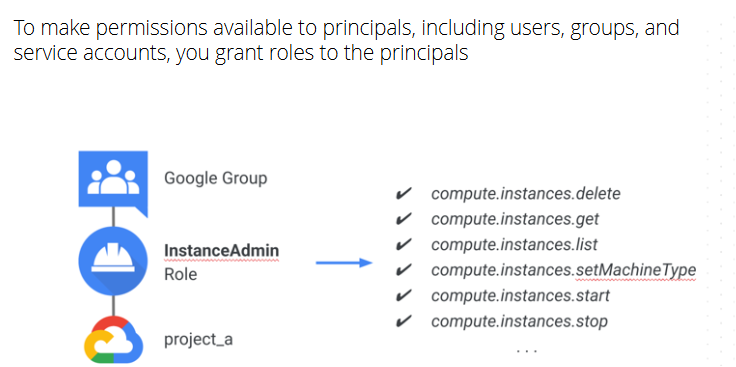
Role - Define a permission of each entity within the group/principal. To make a permission is available into principals including user, group and service accounts, we need to give a proper roles assign into principals.

  • Policies are inherit from top to bottom approach,  There is a no ways to remove the permission that was grant at the top level into resource level.
Different types of Roles in GCP:
  • Basic Role - Owner, Editor and view
  • Predefined Role - Service specific role [pub/sub subscriber]
  • Custom Role - Based on user specified list of permission

Service account:

We can create a service account for automation of manual task. We can able to create a service account through GUI or glcoud CLI.
#gcloud compute instances create myinstance --service-account servicename

Create a service account for PubSub subscription
#gcloud pubsub subscriptions create [subscription_name] --topic [Topic_name] --push-endpoint=[Cloud_Run_Service_URL] --push-auth-service-account=[serviceacountname]@prjectid.iam.gserviceaccount.com

Best practice of Access Management:
  •    Donot grant a basic roles [Owner, Editor, viewer]
  •    Have more than one organization admin
  •    Grant roles to Google groups instead of individuals
  •    Be cautious when granting the Service Account user role
  •    Regularly check Cloud Audit logs and audit IAM policy changes.